Star Engine Update II
Last updated 7/17/08
Thank you for downloading the Star Engine, a shooter engine designed for furcadia.
Downloads:
Star Engine.
Collection.zip. Collection of Star Engine maps. Note: If you have a map that you want to add to my collection, email me.
*Note: Look at collection.zip for more examples.
Getting Started
Setting up your dream settings
Since the Star Engine should be able to be used for people in all levels, I will walk you through this. Once you extract the dream, ds, and patch, make a copy of the dream and ds and change the filename of both of these. Once you have done that, open up your new dream and select
Dream --> Dream settings
Go to the patches directory where you extracted your patch and select that directory. Then press ok.
But we're still not done. Now where it says dream name, write it in this format:
SE- [your dream name]
It could be something like, "SE- Water Palace" or something like this.
Now open your DS editor and do a search for "Test map" (Press Ctrl-F and type that in) Replace "Test Map" with the name of your dream, say, "Water Palace".
Creating your dream
By now, of course, you're probably itching to create your dream, yes? First thing you need to do: delete the test map. This process is tedious, but you need to listen carefully. Do NOT remove this:

Or this:

These are both system parts of the map and are VERY important. Once you have the rest of the map removed, you can start building your dream. You can change the floors, but nothing else. Once you're done with that...
Editing your spawn points
This is VERY important. If you do not edit this, you could teleport ANYWHERE on your map. To edit the spawn points, do a search for "***my code***" and scroll up a little. You should see something like,
when someone moves to floor type 134,
and spwnpt = 1
move to (#, #)
You need to edit the move to point. In the updated version of Furcadia, you can now hold down ctrl and click on a position in dream editor and it is copied in the clipboard. Just select the "#, #" and press Ctrl-V. Then replace all ten of the spawn points.
Want to edit the spawn points? Scroll up a little further and modify the
Set %spawnpt to a rolling of 1 dice with 10 sides plus 0
Say you want team 1 to have the first 8 spawn points and team 2 to have the last two. The first one should be modified:
set %spawnpt to a rolling of 1 dice with 8 sides plus 0
And the second one:
set %spawnpt to a rolling of 1 dice with 2 sides plus 8
That is all.
Regenerating weapons, health kits, etc.
Keep in mind that to regenerate weapons, you must use this floor:
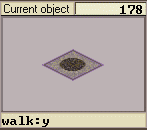
You may notice something: there are THREE of these floors. The first one (floor 178), in the default patch, regenerates weapons. The second one (floor 501) regenerates ammunition, and the third one (floor 502) regenerates health kits. Be sure to place your weapons / ammunition / health on the appropiate floors!
Modifying the patch
Naturally, there are many things that you might want to modify in the patch. The following things can not be replaced:
1. The weapons/ammo/health (they can be improved if you have a better model)
2. The projectiles / particles. ESPECIALLY these.
3. The built-in floors (this messes up the system.)
Other than that, you've got it. You can add objects and floors to the patch, (AFTER the system ones) and not hurt anything. And to change the teams image, modify local1.fsh and local2.fsh.
Thank you for trying the star engine.
Note: If you are downloading an update and need to update your script, do this:
Open the updated ds and do a search (Ctrl-F) for Teleport I
Copy everything above that
Open your script and do that same search. Delete everything above it.
Just a tip: Hold down shift and press PgUp repeatedly until you get to the top.
WARNING!!! Do NOT delete this: DSPK V03.00 Furcadia. It varies from each version of furcadia, and MUST remain the same!
And your script is updated!
Update: 7/17/08: Ok, when making the collection, I got annoyed trying to remove all the floors and such from the
Test Map, so I made an empty map file. This map file gives you a quick starting place. Enjoy!
Update II
When one of my friends was playing on one of my maps, Lost Ocean Palace, I noticed she tried to shoot a rocket launcher off
an edge. Well, the way the script was written, it hit her, instead! It doesn't make logical sense, so let me show
you...ONE NEW MAGICAL FLOORS!

I know, it's awesomely drawn! :-p No, really. This floor is a special function floor. You may recall these:
They serve special functions in ds. Well, so do these.
They are not to be visible. You place them right HERE:
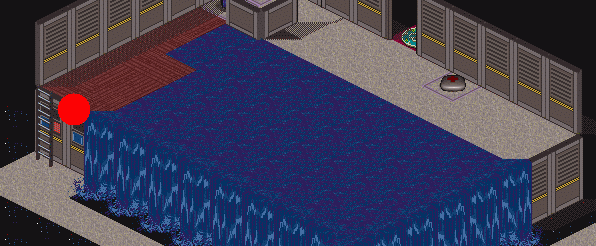
Oooh! Awesome special effects. :-p
See where that red dot is, right at the top of the wall? That's where you place it. The arrows point in the direction to where the projectiles will be going.
And also another note...you may notice the arrows turn invisible on the patch, right? Well, the ds addition also comes with a timer that keeps it invisible the whole time. That way, you can put
it in over a doorway and it won't be noticed.
Update: 8/2/08
A few updates here...you may recall the punch function, right? It didn't make much sense to make it strong, but then
again, that was ridiculous to use, too, so I replaced it with a light sabre. You will need both the patch AND the code to
use this update.
Also, I replaced the Grenade Launcher. Yeah, we all hate that, because you have to be RIGHT ON THE SPOT. Someone wanted a shotgun,
and someone gave me the idea of calling it the "Aestroid Zapper." I thought that was awesome, so I added that in.
Like a shotgun, of course, you have to be close up for maximum damage.